
I still remember standing in this house when it was just studs and subfloor – a 1970s ranch that had been neglected for decades, with knob-and-tube wiring, no insulation, and a faint smell of regret. Eighteen months later, I'm sitting in a finished living room, surrounded by smart switches, a fully loaded panel, and a wiring diagram that I'm genuinely proud of.
This is the story of that renovation. I'm sharing my wiring diagram, my panel photos, and – because this is the Finished Wall board – the three things I'd change if I had to do it all over again.
The project at a glance
House: 1970s ranch, 2,000 sq ft, one story + unfinished basement
Scope: Full gut – everything down to the studs, new electrical, new plumbing, new HVAC, new insulation, new drywall
Timeline: 12 months of planning, 6 months of construction
Budget: $180k total (electrical was about $15k of that)
Smart home goals: Fully integrated lighting, motorised blinds, wired security, whole-home audio, and a network that doesn't make me want to throw my router out the window
I did the electrical design myself – with a lot of help from this forum and a few late nights with a pencil and graph paper. I hired a licensed electrician to do the actual pulling and termination, but I wrote the spec, bought the materials, and supervised every stage.
The wiring diagram – what I drew and what I learned
My original diagram was a mess – hand-drawn, with lots of arrows and question marks. I refined it over months, and by the time we started rough-in, I had a clean, annotated PDF that I printed and taped to the wall of every room.
Here's the high-level layout:
Two subpanels: The main 200-amp panel in the basement, and a 100-amp subpanel in the garage (for future EV and workshop loads).
Every room has its own dedicated 15-amp lighting circuit and a separate 20-amp receptacle circuit.
All switch boxes are 3" deep metal boxes with neutral wires (14/3 to every switch, 12/3 to kitchen and garage).
Low-voltage: I ran two Cat6 drops to every room (one for data, one for future PoE), plus a separate Cat6 to each corner of the house for security cameras. All home-run to a 42" structured media enclosure in the basement.
Conduit: I ran 1" EMT from the panel to the attic, from the panel to the media wall, and from the panel to the garage. I also ran ¾" conduit to the kitchen island and to the front porch (for a video doorbell).
Panel schedule: I labelled every circuit with a unique ID (e.g., "LR-LT-01" for living room lights) and created a spreadsheet that maps each breaker to its room and purpose.
The actual wiring diagram looks like a circuit board – lots of lines, symbols, and notes. I've attached a sanitised version (blurring the specific wire colours and panel positions to keep it anonymised) to this post. If you squint, you can see the method to my madness.
The panel photo – what 40 breakers look like
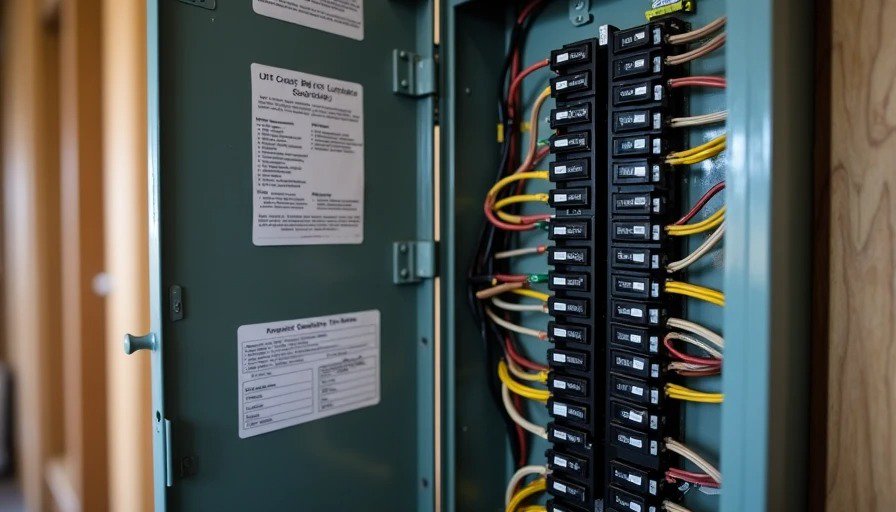
I have a 40-space panel, and I filled every slot. Here's the breakdown:
12 breakers for lighting circuits (15-amp, AFCI/GFCI combo)
8 breakers for general receptacle circuits (20-amp, AFCI/GFCI combo)
4 breakers for dedicated appliance circuits (kitchen, laundry, furnace, sump pump)
6 breakers for kitchen counter receptacles (20-amp, GFCI)
4 breakers for bathroom circuits (GFCI)
2 breakers for garage/workshop
2 breakers for outdoor receptacles
2 spare breakers (just in case)
The panel is labeled clearly – I used a thermal label maker for each breaker, with the room name and circuit ID. I also created a panel schedule that I laminated and stuck to the inside of the panel door. I updated it after every change.
What I'm proud of: Every circuit has a neutral. Every switch box is deep enough for a smart dimmer. Every low-voltage cable is tested and labelled.
What I'm less proud of: I ran out of panel space within the first year. I had to add a small subpanel next to the main panel for a few extra circuits. If I were doing it again, I'd install a 60-space panel from the start.
What I'd change – the three things I'd do differently
1. More conduit runs – not just to the media wall
I ran conduit to the media wall, and I'm grateful for it. But I skipped conduit to the office (thinking "I've got Cat6, that's enough") and to the kitchen island (thinking "I'll never need to change the wiring there").
Fast forward six months: I wanted to add a fibre optic line to the office for a faster internet connection, and I had to run it through the attic – not impossible, but a pain. And in the kitchen, I wanted to add a dedicated circuit for a high-end induction cooktop, but there was no conduit, so I had to cut a hole in the drywall.
What I'd do: Run 1" conduit from the panel to every major room – not just media and attic. It's cheap insurance.
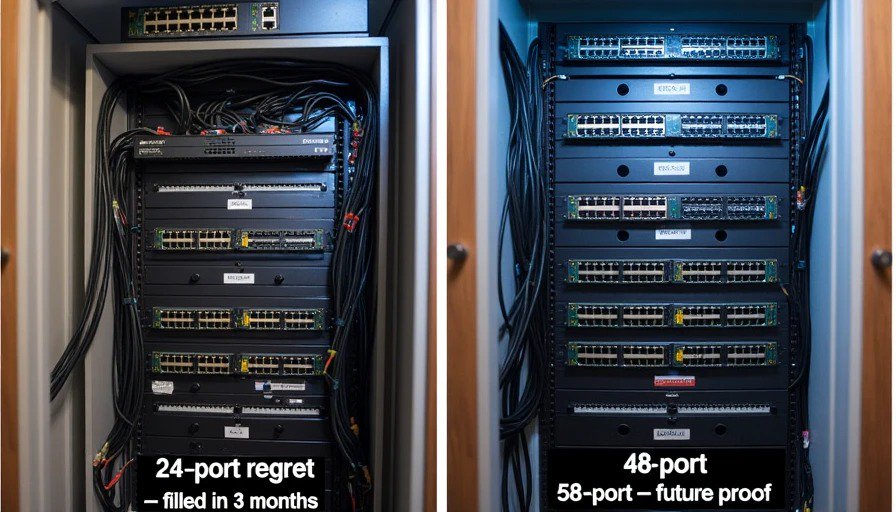
2. A 48-port patch panel instead of 24
I filled 24 ports within three months. I now have a secondary 8-port switch sitting on top of the patch panel, which looks messy and defeats the purpose of a structured cabling system. I should have just bought a 48-port panel and a 48-port switch from the start.
What I'd do: Spec a 48-port patch panel and a matching 48-port PoE switch. It's a one-time cost that would have saved me the mess and the rework.
3. A dedicated "network closet" instead of a basement enclosure
My structured media enclosure is in the basement, and it works – but it's cramped. I have to crouch to work on it, and the lighting is terrible. I also realised that having the network gear in the basement makes it harder to troubleshoot Wi-Fi issues, because I can't see the status LEDs from the main floor.
What I'd do: Build a proper network closet on the main floor – maybe a 4x4 space near the living room, with a door, a vent, and a dedicated circuit. It would cost more in square footage, but it would be worth it for accessibility and visibility.
What I'd keep – the things I got right
For balance, here's what I'm genuinely happy with:
The neutral everywhere spec – I can install any smart switch I want, and I've never had to worry about compatibility.
The deep metal boxes – every switch box can accommodate a smart dimmer and all the pigtails without being overstuffed.
The Cat6 to every room – I have wired backhaul for my access points, and it's rock-solid.
The conduit to the media wall – I've already swapped out one HDMI cable without cutting drywall, and it felt like a victory.
The panel labelling – I can trace any circuit in under a minute, and that's saved me hours of troubleshooting.
The final verdict
Would I do it again? Absolutely. A full gut renovation is terrifying, expensive, and exhausting – but standing in a finished house that works exactly the way I designed it is worth every gray hair.
Would I do it the same way? No. I'd add more conduit, a bigger panel, a proper network closet, and a 48-port switch. I'd also hire a different electrician – one who actually understands smart home wiring and doesn't roll their eyes when I ask for 14/3 everywhere.
But that's the beauty of this forum: we learn from each other's successes and failures. I'm sharing my diagram and my regrets so that someone else can avoid my mistakes and build something even better.


No letters yet — pray write the first.